Sage Accounting vs Sage 50cloud: Cloud vs Desktop — Which Should You Choose?
A comparison between Sage's cloud-native platform (Sage Accounting, £15-£59/mo) and its legacy desktop software (Sage 50cloud, £103-£209/mo). We cover access (anywhere vs Windows-only), pricing (cloud is significantly cheaper), features (50cloud has deeper inventory and job costing), multi-user setup, automatic updates, and the migration path from desktop to cloud. Includes honest guidance on when to stay on Sage 50 (complex inventory, advanced job costing) and when cloud is the better move (remote access, lower cost, MTD compliance).
Ledger Businesses is reader-supported. When you buy through links on our site, we may earn an affiliate commission at no extra cost to you. Learn more.
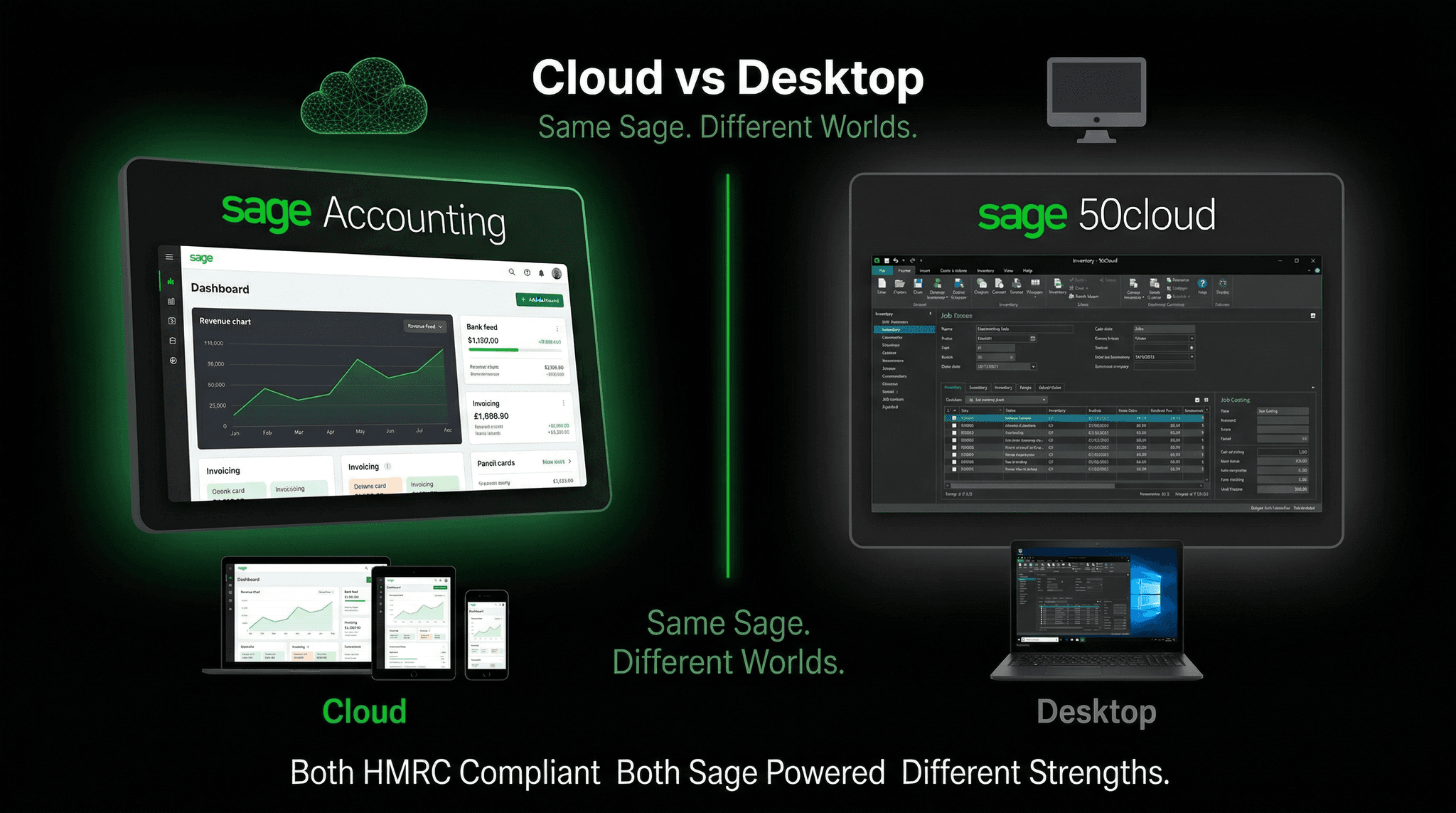
This is one of the most common questions Sage users ask in 2026, and it is a genuinely important decision. Sage Accounting and Sage 50 cloud are both made by Sage, both used by hundreds of thousands of UK businesses, and both capable of handling day-to-day bookkeeping, VAT returns, and financial reporting. But they are fundamentally different products built on different philosophies — and choosing between them has real implications for your workflow, costs, and long-term software strategy.
The short version: Sage Accounting is a cloud-native Software-as-a-Service product, accessed entirely through a web browser, available anywhere, updated automatically, and priced on a monthly subscription. Sage 50cloud is traditional desktop accounting software with cloud extensions bolted on — it lives on a Windows PC, offers deeper functionality for complex accounting needs, and costs significantly more. Sage's own long-term strategy is clear: the company is migrating users toward the cloud. But Sage 50cloud remains the right answer for a specific and substantial set of businesses — for now.
Sage Accounting suits most UK SMEs wanting affordable, anywhere-access cloud accounting with automatic updates and bundled MTD compliance. Sage 50cloud suits businesses needing advanced inventory, job costing, bill of materials, or deep multi-company accounting — features not yet available in Sage Accounting.
What Is Sage Accounting?
Sage Accounting (previously known as Sage Business Cloud Accounting) launched as Sage's answer to the cloud accounting revolution led by Xero and QuickBooks Online. It is a fully browser-based product — there is no software to install, no local database, and no dependency on a specific computer or operating system. You log in from any device with an internet connection and your data is there.
Sage Accounting comes in three tiers:
- Start — From £15/mo (+VAT). Single user. Invoicing, bank feeds, VAT returns, MTD compliance, cash flow overview.
- Standard — From £30/mo (+VAT). Up to 3 users. Adds payroll (5 employees), CIS returns, purchase orders, advanced reporting, receipt scanning.
- Plus — From £59/mo (+VAT). Unlimited users. Adds multi-currency, full inventory management, budgeting, and advanced analytics.
All plans include Sage Copilot AI, automatic software updates, bank feed automation with major UK banks, and MTD for VAT compliance. The current promotional offer — up to 90% off for the first three to six months — makes Sage Accounting one of the best-value entry points into cloud accounting for new subscribers.
What Is Sage 50cloud?
Sage 50cloud is the evolution of Sage 50 Accounts, which has been the backbone of UK SME accounting for over three decades. It is installed software that runs on Windows PCs — the 50cloud branding refers to cloud connectivity features (Microsoft 365 integration, remote access via Microsoft Azure, and cloud backup) that were added to the traditional desktop product.
Sage 50cloud comes in two main editions for the UK market:
- Standard — Approximately £103/mo (+VAT). Designed for businesses with straightforward bookkeeping needs but wanting the depth and established workflow of desktop accounting.
- Professional — Approximately £209/mo (+VAT). Adds advanced inventory, bill of materials, job costing, project accounting, and support for more concurrent users.
Both editions include MTD for VAT compliance, multi-currency, departmental reporting, and access to Sage's UK telephone support. The software is updated periodically (typically aligned with each tax year) rather than continuously.
Pricing: A Significant Difference
| Plan | Monthly Cost (ex. VAT) | Annual Cost | Users |
|---|---|---|---|
| Sage Accounting Start | £15/mo | £180/yr | 1 |
| Sage Accounting Standard | £30/mo | £360/yr | Up to 3 |
| Sage Accounting Plus | £59/mo | £708/yr | Unlimited |
| Sage 50cloud Standard | ~£103/mo | ~£1,236/yr | Up to 2 concurrent |
| Sage 50cloud Professional | ~£209/mo | ~£2,508/yr | Up to 5 concurrent |
The price difference is stark. Sage 50cloud Standard costs roughly three and a half times more than Sage Accounting Standard per month. Sage 50cloud Professional costs more than three times what Sage Accounting Plus charges. For businesses already on Sage 50cloud evaluating whether to migrate, this cost differential alone often makes the cloud option attractive — provided Sage Accounting can do everything they need.
Access: The Fundamental Difference
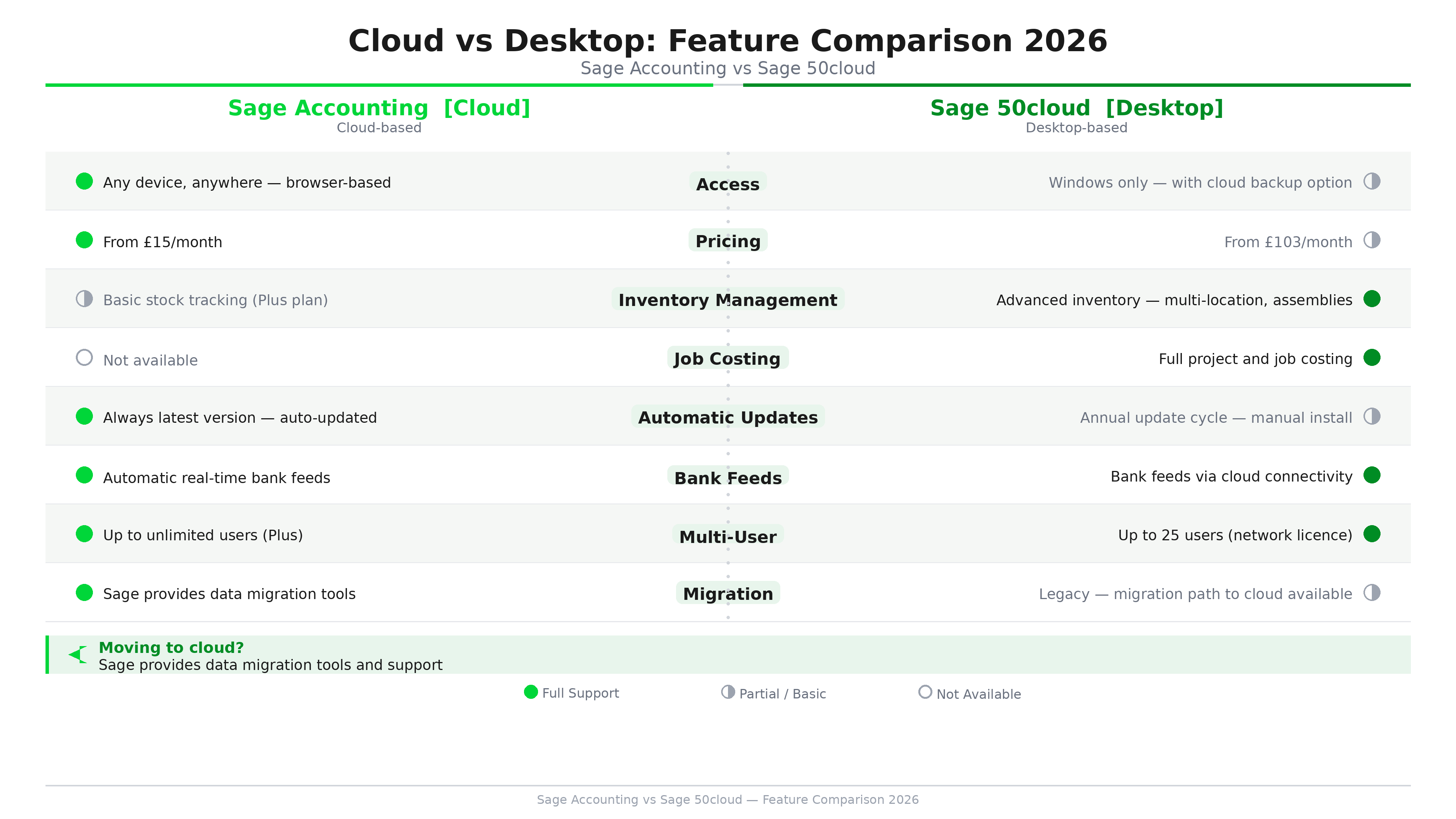
This is arguably the most important practical difference between the two products. Sage Accounting is accessible from any device with an internet browser — Windows, Mac, iPad, Chromebook, or mobile phone. Log in from home, a client's office, an airport, or anywhere with connectivity. Multiple users can be logged in simultaneously from different locations.
Sage 50cloud requires a Windows PC. The software installs on Windows machines and the data is stored locally (with optional cloud backup). While the Microsoft Azure remote access feature allows connecting to the computer running Sage 50cloud from another device, this adds complexity and latency compared to native cloud access. Mac users cannot run Sage 50cloud natively — only via virtualisation software, which introduces its own complications.
For businesses with remote teams, accountants working from different locations, or owners who work from multiple devices, this difference is significant. For businesses where accounting is done by one person, on one Windows PC, in one office, the cloud access advantage of Sage Accounting is less compelling.
Feature Depth: Where Sage 50cloud Wins
Despite costing more and having access limitations, Sage 50cloud retains genuine advantages in functional depth for specific use cases.
Inventory Management
Sage 50cloud's inventory management is substantially more capable than Sage Accounting Plus. Sage 50cloud Professional supports bill of materials (ideal for manufacturers who assemble products from components), multiple warehouse locations, serial number tracking, batch tracking, and complex stock valuation methods. Sage Accounting Plus includes inventory tracking but at a simpler level — appropriate for product-based businesses with straightforward stock needs, not for manufacturers or distributors with complex inventory requirements.
Job Costing and Project Accounting
Sage 50cloud Professional includes detailed job costing features that allow businesses to track the profitability of individual projects, jobs, or contracts — allocating income and costs at the project level and producing project profitability reports. This is particularly valuable for construction companies, engineering firms, and professional services businesses that need to understand margin at a project level. Sage Accounting does not currently offer equivalent job costing depth.
Bill of Materials
For light manufacturers and assembly businesses, Sage 50cloud Professional's bill of materials functionality allows you to define products as assemblies of components, track raw material stock, and post assembly transactions that convert components into finished goods. This process is not available in Sage Accounting Plus, making Sage 50cloud essential for any business that manufactures rather than simply resells.
Departmental Reporting
Sage 50cloud allows detailed departmental analysis — tracking income and costs by department or cost centre with granularity that exceeds what is currently available in Sage Accounting. Businesses with multiple divisions or trading entities that need to understand profitability by area will find Sage 50cloud's departmental reporting more capable.
Multi-Company Accounting
Sage 50cloud supports multiple company files, with the ability to switch between them easily. Accountants managing books for multiple clients, or holding companies with multiple subsidiaries, have used this feature for decades. Sage Accounting handles multiple separate subscriptions rather than multi-company within a single installation — functionally similar but structured differently.
| Feature | Sage Accounting Plus | Sage 50cloud Standard | Sage 50cloud Professional |
|---|---|---|---|
| Cloud/anywhere access | Yes (full) | Remote access only | Remote access only |
| Mac compatible | Yes | No (Windows only) | No (Windows only) |
| MTD for VAT | Yes | Yes | Yes |
| Inventory management | Yes (standard) | Yes (standard) | Yes (advanced) |
| Job costing | No | No | Yes |
| Bill of materials | No | No | Yes |
| Departmental reporting | Basic | Yes | Yes |
| Multi-currency | Yes | Yes | Yes |
| Bundled payroll | Yes (Standard+) | Separate cost | Separate cost |
| Sage Copilot AI | Included | Not available | Not available |
| Automatic updates | Yes (continuous) | Annual | Annual |
| Monthly cost | £59/mo | ~£103/mo | ~£209/mo |
Feature Depth: Where Sage Accounting Wins
The picture is not one-sided. Sage Accounting has genuine advantages that Sage 50cloud does n
Sage Copilot AI
Sage Copilot AI is included on all Sage Accounting plans at no additional cost. Copilot provides intelligent cash flow forecasting, anomaly detection on transactions (flagging unusual entries or potential errors), automated bank reconciliation suggestions, and natural-language queries about your financial data. Sage 50cloud does not currently include Copilot AI. For businesses that want AI-assisted bookkeeping built into their workflow, Sage Accounting has a meaningful advantage that is not available on the desktop product.
Bundled Payroll
Sage Accounting Standard includes payroll for up to five employees at no additional cost — full RTI filing, pension auto-enrolment, P60 and P45 generation, and CIS returns. On Sage 50cloud, payroll is a separate product with separate licensing costs. For a small business with a handful of employees, the bundled payroll on Sage Accounting Standard represents genuine savings compared to equivalent Sage 50cloud plus Sage Payroll licensing.
Automatic Updates and MTD Readiness
Sage Accounting updates automatically — when HMRC changes MTD requirements, when tax thresholds update, or when new features are released, the platform updates itself without any action required from you. Sage 50cloud updates are typically released annually, requiring download and installation. In a regulatory environment that is changing rapidly — with MTD for Income Tax arriving in April 2026 — automatic, continuous updates are a meaningful operational advantage.
Bank Feed Automation
Both products support bank feeds, but Sage Accounting's bank feed integration is more modern. Open Banking connectivity with major UK banks — Barclays, HSBC, Lloyds, NatWest, Santander, Starling, Monzo, and others — is built into Sage Accounting with automatic daily transaction imports and AI-powered categorisation. Sage 50cloud's bank feed functionality works but was developed earlier and requires more manual intervention in some scenarios.
Updates and Longevity: Understanding Sage's Direction
Sage has been transparent about its strategic direction: the company is investing primarily in cloud products and guiding users toward Sage Accounting over time. This does not mean Sage 50cloud is being abandoned — it remains actively maintained, regularly updated, and supported by UK telephone support. But the innovation pipeline — AI features, new integrations, MTD for ITSA capabilities — is primarily being built for Sage Accounting rather than Sage 50cloud.
For businesses evaluating a long-term software commitment, this matters. Choosing Sage 50cloud today means remaining on a product that will receive security updates and tax year patches, but may not receive the new AI-driven features that Sage is developing for its cloud platform. Choosing Sage Accounting means access to the features Sage is actively building — Copilot AI enhancements, the MTD AI Agent, and future integrations.
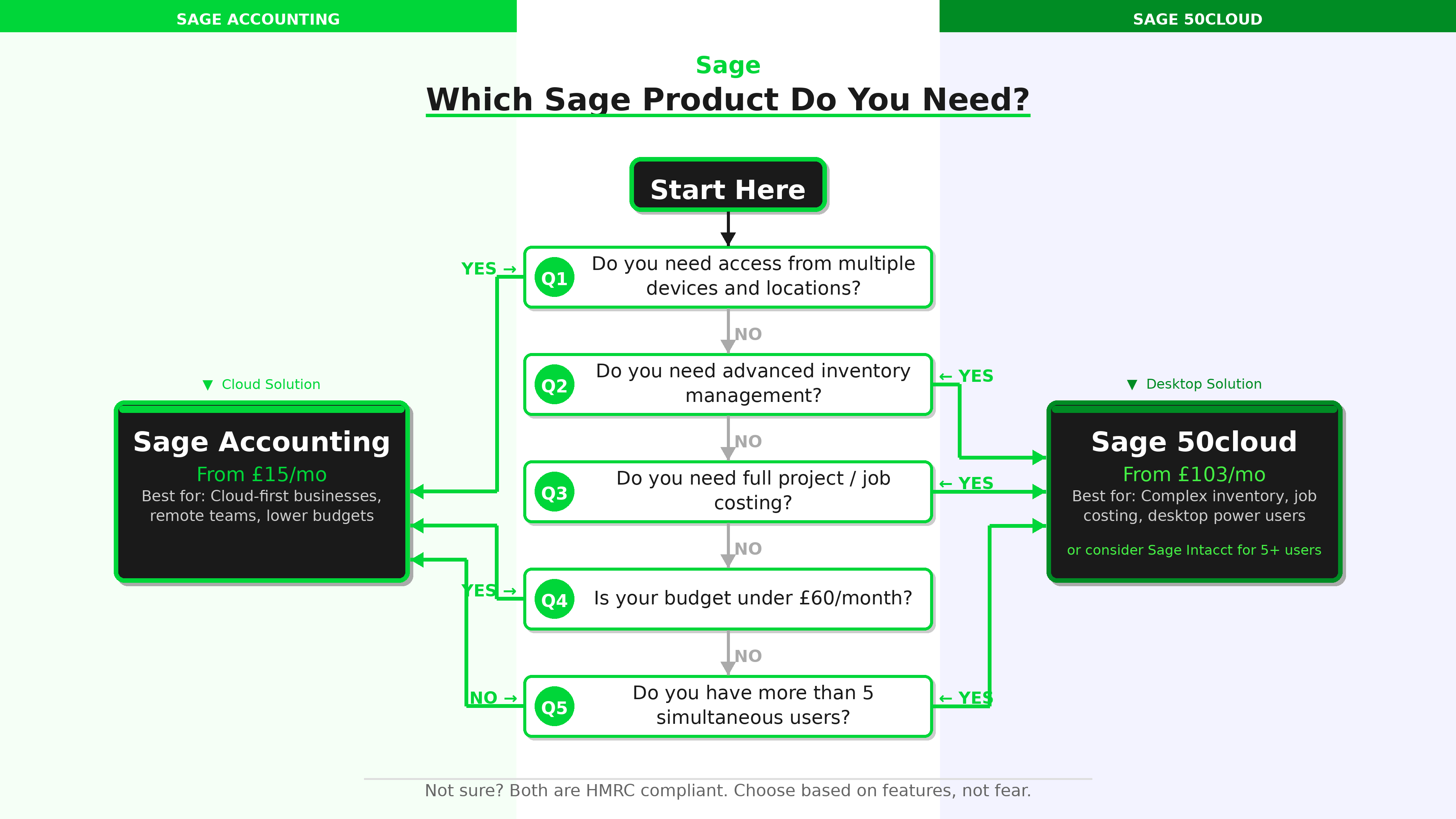
Sage's investment is primarily in cloud. If you are evaluating a new Sage implementation, cloud-first makes sense unless you have specific features — job costing, bill of materials, advanced inventory — that only Sage 50cloud currently provides. If you are an existing Sage 50cloud user happy with your current workflow, there is no urgency to migrate, but start planning.
Migration: Moving from Sage 50cloud to Sage Accounting
Sage provides a migration pathway for existing Sage 50cloud users who want to move to Sage Accounting. The process involves exporting data from Sage 50cloud, importing it into Sage Accounting, and reconfiguring settings — primarily chart of accounts, customer and supplier records, and opening balances. Sage's support team can assist with migration planning.
The best time to migrate is typically at the start of a new financial year or at the beginning of a new VAT quarter, when opening balances are clean and transaction history is clear. Migrating mid-year is possible but more complex. Before migrating, businesses should audit whether Sage Accounting Plus covers all the features they currently use in Sage 50cloud — particularly around inventory, job costing, and multi-company accounting.
Some features do not have direct equivalents in Sage Accounting yet. If your business relies on bill of materials, detailed project accounting, or complex multi-location inventory, do not migrate until Sage Accounting adds these capabilities or until you identify alternative solutions within the cloud ecosystem.
Multi-User Access Compared
Multi-user access works very differently between the two products. Sage Accounting Standard supports up to three users, with the Plus plan supporting unlimited users — all working simultaneously from anywhere. User management is straightforward, with role-based access controls that limit what each user can see and do.
Sage 50cloud Standard licenses up to two concurrent users; Professional licenses up to five. Additional users require additional licensing costs. All users must be on the same local network or connect via remote access — there is no native browser-based multi-user access. For businesses where the accounts team works in different locations, Sage Accounting's true multi-user cloud access is a significant practical advantage.
Which Businesses Should Stay on Sage 50cloud?
Despite the cloud-first direction, there are genuine scenarios where Sage 50cloud remains the right choice in 2026:
- Manufacturing businesses that rely on bill of materials and production order management
- Construction and engineering firms using job costing and project profitability tracking
- Distributors and wholesalers with complex multi-location inventory, batch tracking, or serial number requirements
- Businesses with highly customised Sage 50cloud configurations including bespoke report layouts, custom nominal codes, and complex departmental structures that would require significant effort to replicate
- Businesses with very slow or unreliable internet connections where cloud dependency is a genuine operational risk
- Accountancy practices managing multiple client files within a single installation who prefer the multi-company approach of the desktop product
Which Businesses Should Move to Sage Accounting?
- New businesses setting up accounting software for the first time — start cloud-native rather than inheriting legacy architecture
- Businesses with remote teams or accountants working from different locations
- Mac users who cannot run Sage 50cloud natively
- Businesses where payroll is bundled — Sage Accounting Standard's included payroll for 5 employees represents real savings
- Businesses prioritising AI features — Copilot AI, anomaly detection, and the MTD AI Agent are cloud-only
- Service businesses without complex inventory needs — accountants, consultants, agencies, tradespeople, and retailers with simple stock requirements
- Cost-conscious businesses — at £30/mo vs £103/mo for comparable tiers, the savings are substantial
Our Verdicts
For Most UK SMEs: Sage Accounting
The combination of genuine cloud access, lower pricing, bundled payroll, Copilot AI, and automatic MTD updates makes Sage Accounting the right choice for the majority of UK SMEs in 2026. If your accounting needs are straightforward — invoicing, bank reconciliation, VAT, payroll, basic reporting — you will pay significantly less and get more innovation on the Sage Accounting platform than you would on Sage 50cloud.
- 3–4× lower monthly cost than equivalent Sage 50cloud
- Access from any device, any location
- Sage Copilot AI included at no extra cost
- Automatic updates including MTD compliance
- Payroll bundled on Standard and Plus
For Complex Manufacturing and Project-Based Businesses: Sage 50cloud
If your business relies on bill of materials, job costing, advanced inventory management, or complex departmental accounting, Sage 50cloud Professional remains the right tool despite its higher cost. Do not migrate to Sage Accounting until these features are available in the cloud product — and be clear about your specific requirements before doing so.
- Best for manufacturing with bill of materials
- Essential for job costing and project profitability
- Advanced inventory with batch and serial tracking
- Complex departmental and multi-company reporting
For Existing Sage 50cloud Users: Plan Your Migration Timeline
If you are currently on Sage 50cloud and your accounting needs are straightforward, the question is not whether to move to Sage Accounting — it is when. Start by auditing which Sage 50cloud features you actually use. If you are not using job costing, bill of materials, or complex inventory, you are likely paying a significant premium for features you do not need. Map your actual usage against Sage Accounting Plus, calculate the annual saving, and plan a migration at your next financial year end.
- Audit current feature usage before migrating
- Plan migration for financial year start
- Calculate annual savings — typically significant
- Sage support team can assist with data migration planning
Final Thoughts
The Sage Accounting vs Sage 50cloud question is really the desktop vs cloud question — and for most UK businesses in 2026, cloud is the right answer. Lower cost, better accessibility, faster innovation, and automatic compliance updates all point in the same direction. The businesses that should stay on Sage 50cloud are those with genuine, current needs for its deeper functional capabilities — and they should monitor Sage Accounting's development roadmap for when those capabilities arrive in the cloud.
For businesses setting up Sage for the first time, there is almost no reason to start on Sage 50cloud unless you have a specific requirement for job costing or manufacturing features. Start on Sage Accounting, take advantage of the current promotional pricing, and build on a cloud-native foundation that will receive Sage's primary development investment for years to come.