MTD for Landlords 2026: How Sage Sole Trader Handles Property Income Reporting
A targeted guide for UK landlords who must now comply with Making Tax Digital for Income Tax from April 2026 (if earning £50,000+ across all income sources). Explains how quarterly submissions work for property income, how Sage Sole Trader supports separate business instances for landlord vs sole trader income, shared ownership percentage calculations, and which income categories to use. Covers the practical setup, what records to keep digitally, and how landlords with multiple properties should structure their MTD filings.
Ledger Businesses is reader-supported. When you buy through links on our site, we may earn an affiliate commission at no extra cost to you. Learn more.
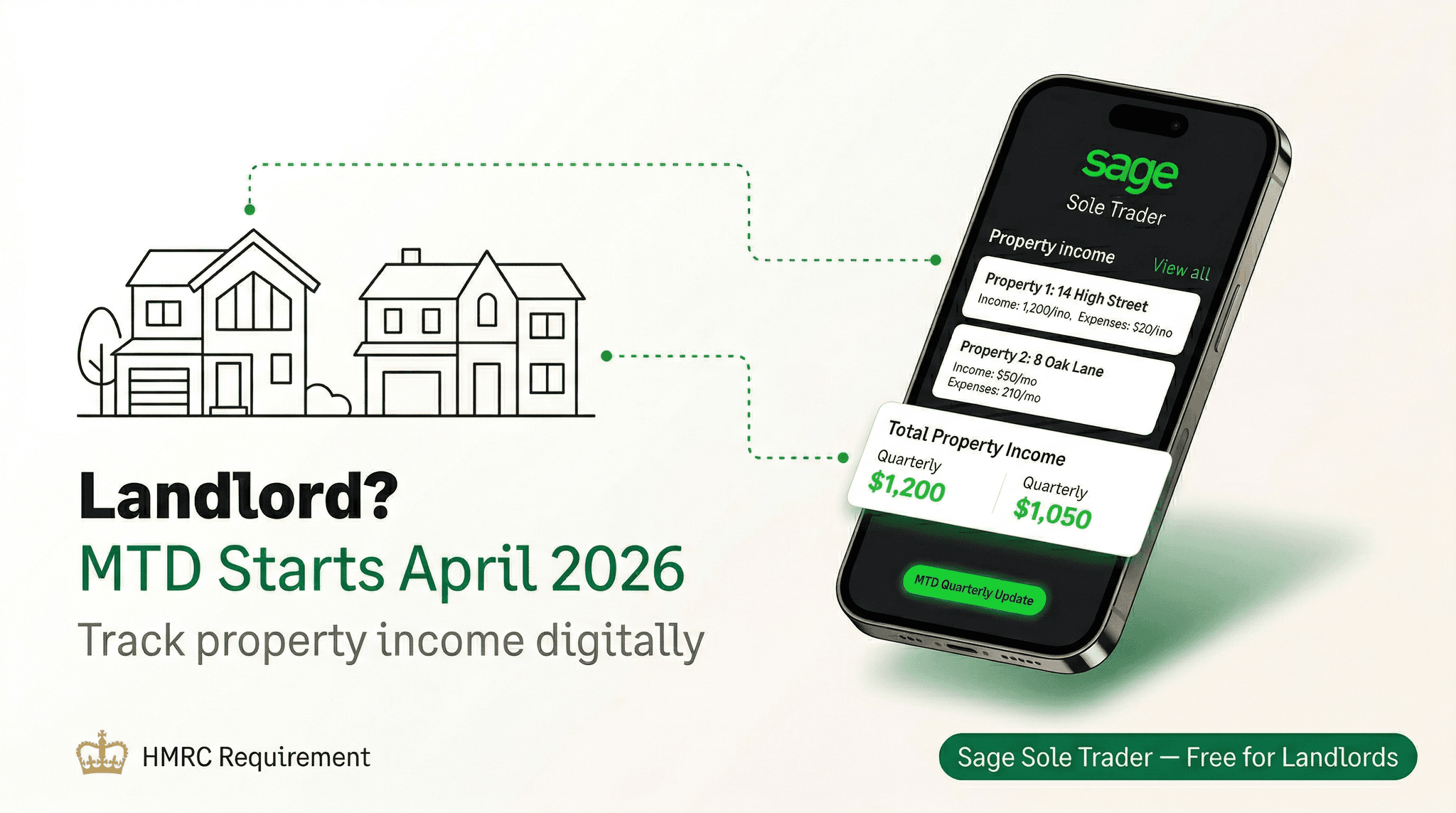
Making Tax Digital for Income Tax Self Assessment (MTD for ITSA) is the biggest shift in UK tax reporting for individual landlords in a generation. From April 2026, if your combined property and self-employment income exceeds £50,000 per year, you must keep digital records and submit quarterly updates directly to HMRC through MTD-compatible software. Annual self-assessment tax returns will not disappear entirely, but the way HMRC receives information about your income and expenses will change fundamentally.
For landlords who have historically filed a single annual self-assessment return — perhaps scribbling numbers into a spreadsheet in January — this represents a significant change in workflow. The good news is that MTD-compatible software, particularly Sage Sole Trader, has been designed precisely for this scenario. This guide walks through what MTD means for landlords, who is affected and when, and how to set up Sage Sole Trader to handle property income alongside any self-employment income you may have.
MTD for ITSA applies to landlords with gross income over £50,000 from April 2026, over £30,000 from April 2027, and potentially over £20,000 from a future date. You must submit four quarterly updates and one end-of-period statement per income source, per tax year.
What Is MTD for ITSA and Why Does It Affect Landlords?
Making Tax Digital for Income Tax Self Assessment is HMRC's programme to move tax reporting away from annual, paper-based returns and towards real-time, digital record-keeping. Under MTD for ITSA, individuals who receive income from property letting or self-employment — or both — above the relevant threshold must:
- Maintain digital records of income and expenses throughout the year
- Submit quarterly summary updates to HMRC via MTD-compatible software
- File an end-of-period statement (EOPS) for each income source once the tax year ends
- Submit a final declaration (replacing the current self-assessment return) to confirm all income for the year
The quarterly deadlines fall on 7 August, 7 November, 7 February, and 7 May for a standard April to March tax year. Each update is a summary of income and allowable expenses — it is not a payment; it simply keeps HMRC informed of your financial position throughout the year. The final tax bill is calculated and paid as before.
Landlords are specifically included because rental income from UK property — whether residential or commercial — counts as a distinct "income source" under MTD rules. If you are both a landlord and a sole trader, you have two income sources, each requiring its own quarterly updates and end-of-period statement. This is where having the right software becomes especially important.
The MTD for ITSA Rollout Timeline
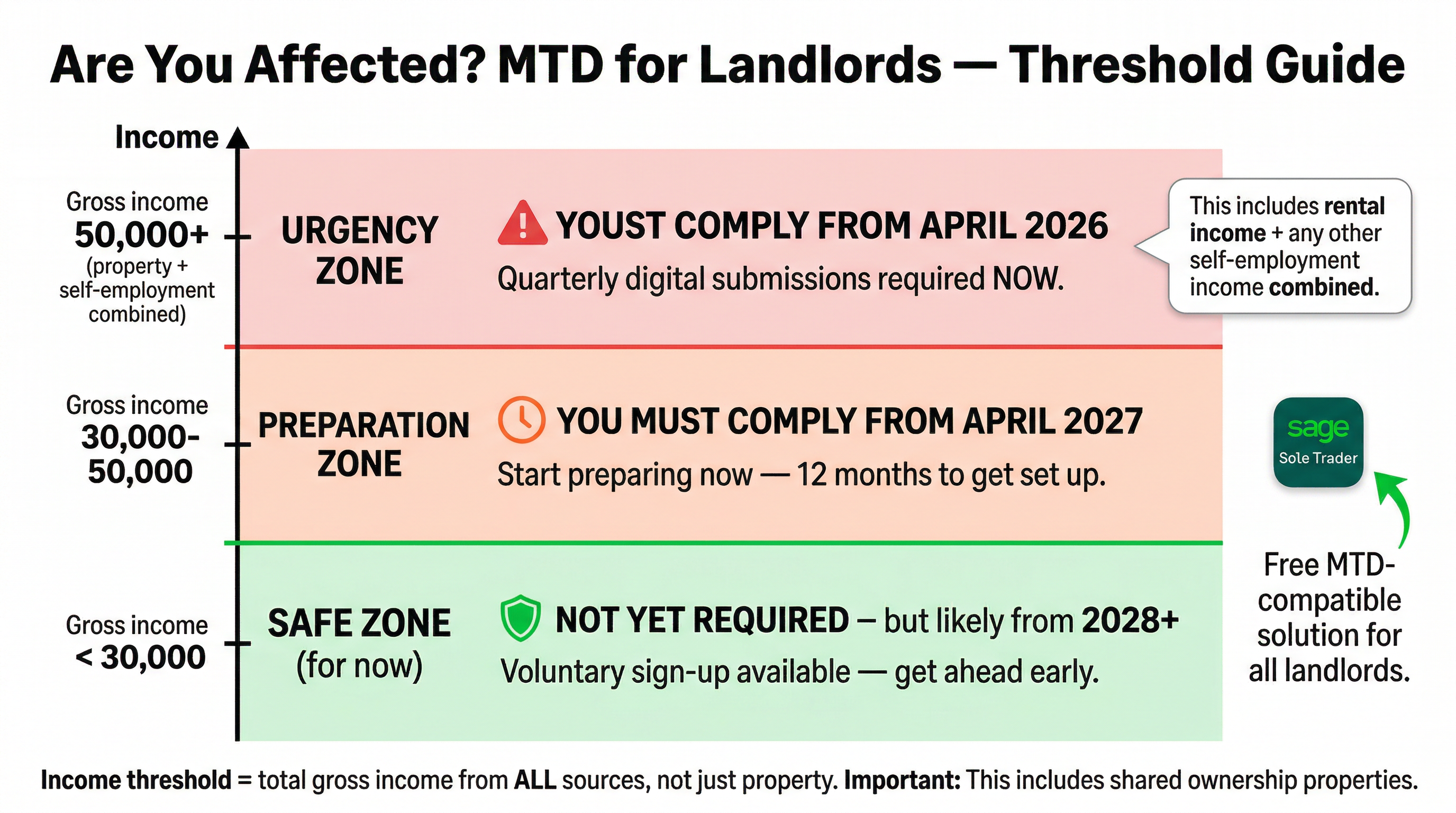
HMRC has phased the rollout to avoid overwhelming the system all at once. Understanding which phase applies to you determines how urgently you need to act:
| Phase | Start Date | Who Is Affected |
|---|---|---|
| Phase 1 | April 2026 | Gross income from property and/or self-employment over £50,000 |
| Phase 2 | April 2027 | Gross income over £30,000 |
| Phase 3 | TBC (likely 2028) | Gross income over £20,000 |
| Partnerships | TBC | Partnership businesses — date not yet confirmed |
Importantly, the £50,000 threshold applies to gross income — before expenses. A landlord with four properties each generating £15,000 in annual rent (£60,000 gross) is in scope from April 2026, even if their net profit after mortgage interest and maintenance costs is substantially lower. This catches more landlords than many people initially assume.
Who Exactly Is Affected: Landlord Scenarios
Scenario 1: Pure Landlord (No Other Self-Employment)
You own one or more rental properties, file a self-assessment return each year, and have no other self-employment income. If your gross rental receipts exceed the threshold, you fall under MTD. You have one income source (UK property), so you submit four quarterly updates and one end-of-period statement for that source each year.
Scenario 2: Landlord and Sole Trader
This is the most complex and most common scenario. Perhaps you run a consultancy or trade business alongside owning buy-to-let properties. HMRC treats these as two separate income sources. You must maintain separate digital records for each and submit quarterly updates independently. Your combined gross income from both sources triggers MTD if it exceeds the threshold — so if you earn £25,000 from self-employment and £30,000 from rent, your combined £55,000 brings you into Phase 1.
Scenario 3: Shared Ownership (Joint Landlords)
Many properties are jointly owned by couples or business partners. Under MTD, each individual is responsible for reporting their own share of the income. HMRC uses percentage-based calculations — if you own 50% of a property generating £40,000 in annual rent, your share is £20,000. Both owners report their individual shares, and each person's threshold is assessed individually. We cover how Sage handles this below.
Scenario 4: Furnished Holiday Lettings (FHL)
From April 2025, furnished holiday lettings have been abolished as a separate tax category and merged with standard UK property income. FHL income is now reported alongside other property income under the same MTD rules. If you previously treated your holiday let as a business for tax purposes, your approach will need to change for 2026 onwards.
Limited companies that own rental properties are not affected by MTD for ITSA. MTD for ITSA applies only to individuals — sole traders, partners in partnerships, and individual landlords. Limited company landlords are subject to corporation tax rules and Making Tax Digital for Corporation Tax, which has a separate (later) timetable.
How Sage Sole Trader Handles Property Income
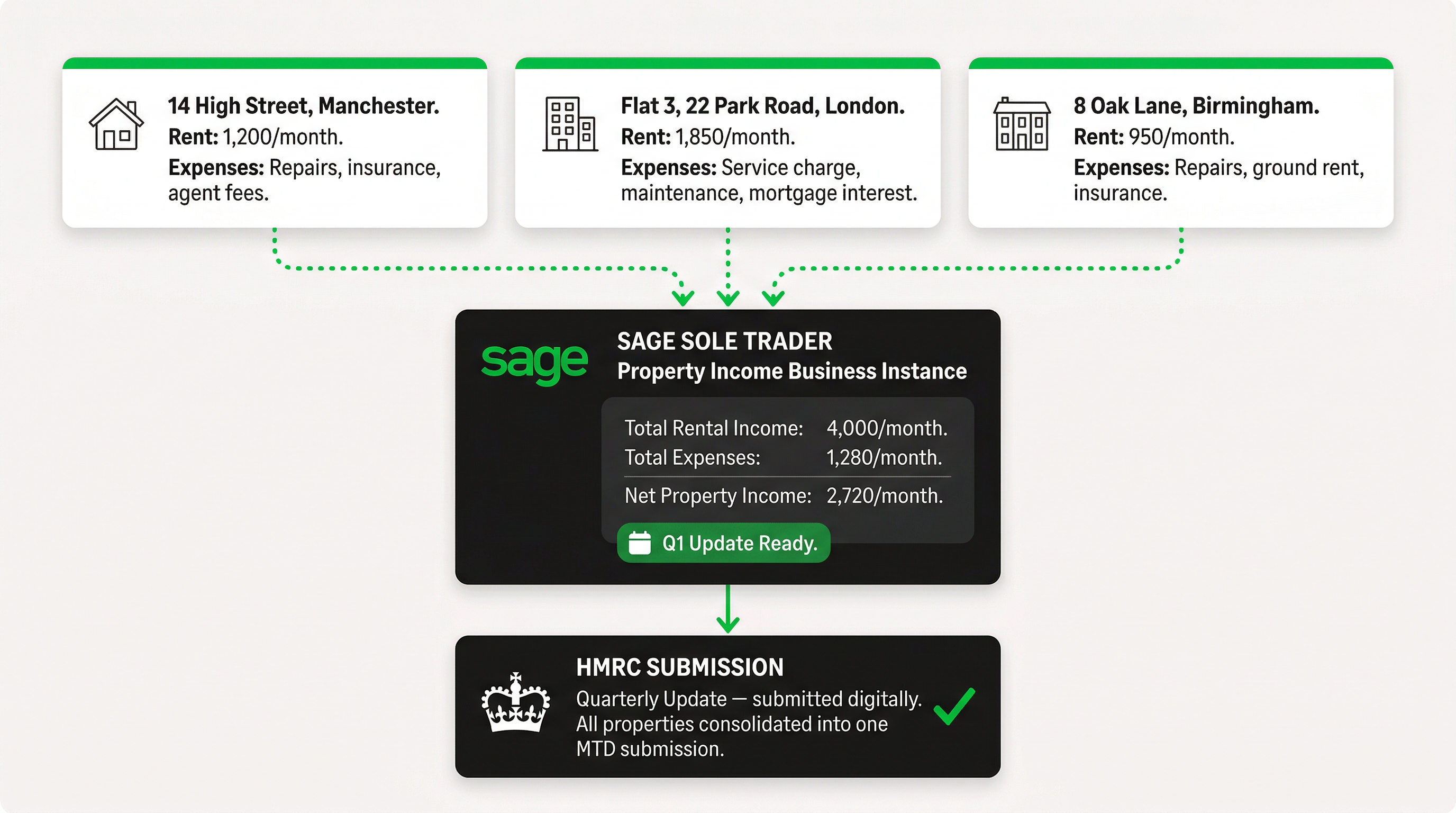
Sage Sole Trader is a cloud-based accounting application designed specifically for self-employed individuals and landlords in the UK. It is one of a relatively small number of products fully approved by HMRC for MTD for ITSA submissions. The application is structured around the concept of separate "business instances" — effectively separate sets of books for each income source you have.
Separate Business Instances for Each Income Source
If you are both a landlord and a sole trader, Sage Sole Trader allows you to set up two entirely separate instances within the same login. Each instance has its own:
- Income and expense categories relevant to that source
- Bank feed connections (you can connect a dedicated landlord current account separately from your trading account)
- Quarterly submission schedule linked directly to HMRC
- End-of-period statement workflow
This means your rental income, letting agent fees, mortgage interest, insurance premiums, and maintenance costs sit entirely separately from your self-employment invoices and business expenses. There is no risk of accidental cross-contamination, and HMRC receives clean, source-specific data in each quarterly update.
Property-Specific Income and Expense Categories
Sage Sole Trader includes income and expense categories pre-mapped to the HMRC property income schedule. For a landlord, relevant categories include:
- Rental income (each property can be tracked individually)
- Mortgage interest (restricted to 20% tax credit for residential properties)
- Letting and management agent fees
- Insurance premiums (buildings, contents, landlord liability)
- Maintenance and repairs (distinguishing between allowable repairs and capital improvements)
- Council tax and utilities paid by the landlord
- Ground rent and service charges (leasehold properties)
- Professional fees (solicitor, surveyor, accountant)
- Advertising and tenant-finding costs
Expenses that are not allowable for tax purposes — such as capital improvements, personal use costs, or mortgage capital repayments — can be marked as "Not applicable" or assigned to non-deductible categories. This prevents inadvertent over-claiming and keeps your quarterly submissions accurate.
Handling the "Not Applicable" Category
One practical challenge for landlords is managing transactions that appear in your bank feed but should not appear in your tax return. Sage Sole Trader addresses this with a "Not applicable" (or "Excluded") category. Common uses include:
- Mortgage capital repayments — these are not a tax expense
- Personal transfers between your own accounts
- Deposits held on behalf of tenants (not income until forfeited)
- Capital expenditure on improvements (treated separately as capital allowances if relevant)
- Proceeds from property sales (handled via capital gains tax, not income tax)
When you categorise a transaction as "Not applicable," Sage excludes it from the quarterly summary sent to HMRC. The transaction remains visible in your records for your own reference but does not distort your income or expense totals. This is a small but important feature that many simpler bookkeeping tools lack.
Quarterly Submissions: The Practical Workflow
Within Sage Sole Trader, the quarterly submission process works as follows:
- Step 1 — Bank feed reconciliation: Connect your landlord bank account to Sage. Transactions import automatically, and Sage's AI categorisation engine suggests a category for each one based on the payee and description.
- Step 2 — Review and categorise: Review each suggested category, accept or correct it, and add any receipts captured via the mobile app. The Sage Copilot AI assistant can flag unusual transactions or remind you of uncategorised items.
- Step 3 — Review the quarterly summary: Before submitting, Sage shows you a summary of total income and allowable expenses for the period. You can see the estimated tax impact, which helps with tax planning.
- Step 4 — Submit to HMRC: With one click, Sage sends the quarterly update directly to HMRC via the MTD API. You receive a submission reference and HMRC acknowledges receipt within seconds.
The process repeats four times per year for each income source. For a landlord-plus-sole-trader, that means eight quarterly submissions per year plus two end-of-period statements. It sounds intensive, but in practice, each submission takes 15-30 minutes once your bank feed is running and categorisation habits are established.
Shared Ownership and Percentage-Based Calculations
Joint ownership of rental properties is extremely common in the UK. Sage Sole Trader handles shared ownership through percentage-based income allocation. When setting up a property income source, you can specify your ownership percentage. Sage then applies that percentage to all rental income from that property before including it in your quarterly summaries and annual calculations.
For example, if you and your partner jointly own a property generating £2,500 per month and you own 60% of it, Sage attributes £1,500 per month to your tax position. Your partner's instance — if they also use Sage — would separately record their £1,000 monthly share. Each of you submits independently to HMRC under your own National Insurance numbers.
More complex arrangements are also supported. Properties owned in unequal shares (for example, 70/30 splits) or properties held in a trust can be configured with custom percentages. The key is ensuring your ownership split is documented correctly — HMRC requires that jointly held property income be declared at the correct ownership proportion, and Sage's percentage fields give you a straightforward way to reflect this.
Married couples and civil partners who own property jointly can in some cases elect to split income at a different ratio to the ownership percentage, using HMRC Form 17. If you are considering this, speak to a tax adviser before configuring Sage, as the income split in the software should match whatever arrangement you have declared to HMRC.
Free vs Paid Plan: What Do Landlords Actually Need?
Sage Sole Trader comes in two versions: a free plan and a paid plan. Understanding the difference is essential before you commit.
| Feature | Free Plan | Paid Plan |
|---|---|---|
| MTD for ITSA quarterly submissions | Included | Included |
| Income and expense tracking | Included | Included |
| Bank feed connection | Limited (manual import) | Automatic live feed |
| Multiple income sources | 1 source | Multiple sources |
| Receipt capture (mobile) | Not included | Included |
| Sage Copilot AI assistant | Basic | Full access |
| Tax estimate and forecasting | Basic | Advanced |
| Phone support | Not included | Included |
| Invoicing (for sole traders) | Not included | Included |
For a landlord only with a single property portfolio and no other self-employment income, the free plan covers the core MTD compliance requirement: digital record-keeping and quarterly submissions to HMRC. The limitation is the lack of automatic bank feeds — you will need to import bank statements manually, which is time-consuming if you have multiple properties generating many transactions.
For a landlord and sole trader with two income sources, the paid plan is essential. The free plan only supports a single income source, which means it cannot handle the dual-submission requirement. The paid plan is also the right choice for landlords with three or more properties, given the volume of transactions that benefit from live bank feeds and AI categorisation.
Practical Setup Walkthrough for Landlords
Step 1: Create Your Sage Sole Trader Account
Sign up for Sage Sole Trader and select "Landlord" as your primary income type during onboarding. Sage will configure your account with property-relevant expense categories by default. If you are also a sole trader, you will add that as a second income source once the initial setup is complete.
Step 2: Connect to HMRC's MTD Service
Navigate to the MTD section within Sage and authorise the connection to HMRC using your Government Gateway credentials. Sage will retrieve your existing tax record and link your National Insurance number to the MTD filing system. This authorisation persists and does not need to be repeated each quarter.
Step 3: Add Your Properties
Within your property income instance, add each rental property separately. Sage allows you to name properties (for example, "14 High Street flat" or "Garage — Elm Road") and track income and expenses at the individual property level. For shared ownership properties, enter your ownership percentage at this stage.
Step 4: Connect Your Bank Feed
On the paid plan, connect your dedicated landlord bank account using Open Banking. Sage supports all major UK banks including Barclays, HSBC, Lloyds, NatWest, Santander, and many building societies. Transactions flow in automatically each day, with Sage's AI suggesting categories based on payee names and transaction patterns.
Step 5: Categorise Historical Transactions
If you are starting mid-year, import historical transactions for the current tax year and categorise them so your first quarterly submission includes complete data. Sage's bulk categorisation tool lets you apply a category to multiple similar transactions at once — useful for recurring items like standing order mortgage payments.
Step 6: Set Up Your Quarterly Submission Calendar
Sage automatically populates your submission calendar with the four quarterly deadlines. You will receive reminders within the app and by email as each deadline approaches. The dashboard shows clearly which quarters have been submitted, which are due, and whether any past submissions have been acknowledged by HMRC.
Comparing Sage Sole Trader with Other Landlord Accounting Options
| Software | Monthly Cost | MTD ITSA Approved | Property-Specific Features | Multiple Income Sources |
|---|---|---|---|---|
| Sage Sole Trader (Paid) | Low monthly cost | Yes — full MTD agent | Property categories, shared ownership % | Yes |
| Xero | From £16/mo (Ignite) | Yes (via MTD module) | General categories only | Requires workaround |
| QuickBooks Sole Trader | From £10/mo | Yes | Basic property income tracking | Limited |
| FreeAgent | From £19/mo | Yes | Good for sole traders, limited landlord focus | Yes (with setup) |
| Landlord Studio | From £12/mo | In development | Excellent property management | No (property-only) |
| Spreadsheet + Bridging Software | Variable | Via bridging tool only | Manual — what you build | Manual |
The key differentiator for Sage Sole Trader among this group is the combination of HMRC approval, native dual-income-source support, and property-specific categorisation within a single low-cost product. Specialist landlord tools like Landlord Studio offer more property management features (tenant tracking, rent collection reminders, maintenance scheduling) but are not yet fully MTD-approved for ITSA quarterly submissions — a significant gap as the April 2026 deadline approaches.
Xero and FreeAgent are both competent MTD-approved products but are designed primarily for sole traders running businesses, not landlords. Property-specific categories and shared ownership percentage calculations require workarounds in both platforms that Sage handles natively.
Common Landlord Questions About MTD
Do I still need a self-assessment tax return?
Under MTD for ITSA, the traditional self-assessment return is replaced by a "final declaration." You still confirm your total income for the year and authorise the tax calculation, but the process happens within your MTD-compatible software rather than on the HMRC website. All the data has already been submitted via your quarterly updates, so the final declaration is largely a confirmation exercise rather than a data-entry exercise.
What if I miss a quarterly deadline?
HMRC is introducing a new points-based penalty system alongside MTD for ITSA. Each missed submission earns a penalty point. Accumulate enough points and a fixed financial penalty applies. The system is designed to be lenient for occasional lapses but consistent for persistent non-compliance. Sage's automated reminders are designed to prevent you reaching the point threshold.
Can my accountant access my Sage Sole Trader data?
Yes. Sage Sole Trader supports accountant access via a separate login. You can grant your accountant read-only or full access to your records. Many accountants who use Sage for Accountants can link directly to your data, which simplifies the end-of-year process and the final declaration considerably.
What if my income drops below the threshold mid-year?
HMRC assesses the threshold on the basis of the previous tax year's income. If you were above the threshold in 2024-25, you are subject to MTD in 2026-27 regardless of what happens to your income in that year. You may be able to apply for an exemption if your circumstances change permanently — for example, if you sell all your properties.
Our Verdict
Best for: Landlords with Only Rental Income
The free plan of Sage Sole Trader covers the MTD compliance essentials. You get HMRC-approved quarterly submissions, digital record-keeping, and property-relevant categories at no cost. The main limitation is manual bank statement imports rather than live feeds.
- Free plan sufficient for basic compliance
- Pre-configured property expense categories
- Direct HMRC integration — no bridging software needed
Best for: Landlord-Plus-Sole-Trader Combination
The paid plan is the clear choice here. Managing two income sources with separate quarterly submission schedules in a single application, with live bank feeds for both accounts, makes the eight-submissions-per-year requirement genuinely manageable. No other product handles this dual-source scenario as cleanly at this price point.
- Multiple income sources with independent submission tracks
- Live bank feeds for both landlord and business accounts
- Sage Copilot AI for categorisation and compliance guidance
- Phone support for deadline-related queries
Best for: Landlords Who Want More Property Management
If your primary need is property management — tracking tenancies, rent arrears, maintenance requests, and portfolio performance — Sage Sole Trader is not the complete solution. Consider pairing it with a specialist property management tool for day-to-day management while relying on Sage for the tax compliance and MTD submission component.
- Use Sage Sole Trader for MTD compliance and tax
- Supplement with property management software for tenancy records
- Ensure any bridging arrangement is MTD-approved if you use a separate tool for bookkeeping
Getting Ready Before April 2026
If your gross property income exceeds £50,000, you have a firm deadline and the worst outcome is non-compliance penalties. The practical steps to take now are straightforward: open a dedicated landlord bank account if you do not already have one (mixing property and personal finances makes reconciliation significantly harder), start recording income and expenses digitally even before your software is fully configured, and sign up for Sage Sole Trader or your chosen MTD tool well before the April 2026 start date to allow time to learn the system and connect your bank feeds.
HMRC's own guidance recommends joining the MTD for ITSA pilot scheme if you want to test the process before the mandation date. Sage Sole Trader is a participating pilot software, meaning you can begin submitting quarterly updates voluntarily now to familiarise yourself with the workflow before it becomes compulsory.
The landlords who will find April 2026 most stressful are those who leave preparation until January 2026. Those who act now, set up clean digital records, and run a few practice submissions through the MTD pilot will find the transition almost frictionless when the mandate kicks in.